Download Adblock Fast free on android
APK file Adblock Fast 2.5.0How to install APK / APKS / OBB file on Android
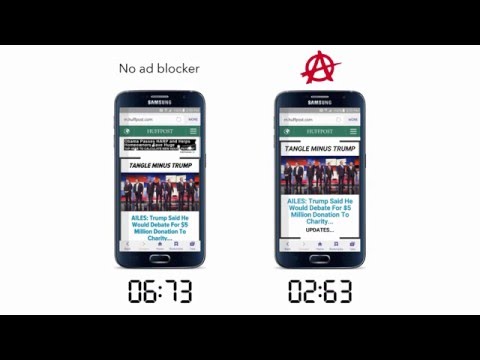

You can now block ads without rooting your device or switching browsers!
Adblock Fast runs optimized filtering rules to accelerate webpages more but consume less CPU, memory, and storage than other ad blockers do. Also unlike other ad blockers, Adblock Fast doesn’t allow “acceptable ads” and never will.
The app requires and blocks ads in Samsung Internet 4.0 and up. After installing, follow the in-app directions to turn blocking on.
We use a public content-blocking API that’s provided by Samsung Internet: https://developer.samsung.com/internet/android/adblockers-guide.html
Adblock Fast is free to use and the source code free to modify: https://github.com/rocketshipapps/adblockfast
If you have any questions or comments, follow and message us:
• https://www.facebook.com/adblockfast
• https://x.com/adblockfast
- LicenseFree
- File nameAdblock Fast
- File Version2.5.0
- Package namecom.rocketshipapps.adblockfast
- Size9.69 MB
- UploadedSeptember 22, 2026
- Android5.0 or later

- CategoryProductivity
- DeveloperRocketship Apps
- Developer sitehttp://adblockfast.com/
- Developer emailhelp@adblockfast.com
- md5 hash0401d59f36464dcb0bca9e29a2e1957d
- Architecturearm64-v8a armeabi-v7a x86_64 x86
- Permissionsshow (9)
